
Microsoft Foundry: from Landing Zone to Internal AI Platform

This is the third post in a short series on Microsoft Foundry architecture and platform design -
Microsoft Foundry: A Mental Model introduced Foundry as a “ factory” and the concepts around projects, models, knowledge, tools, agents, and evaluation
Microsoft Foundry - A Platform Architect’s Guide looked underneath the factory at the Azure plumbing needed to deploy it securely
This post focuses on what comes after deployment: building the self-service journeys, guardrails and delivery workflows that make Microsoft Foundry the core of an enterprise AI platform.
There’s a lot to cover, so feel free to jump to the sections most useful to you and your organisation.
Introduction: The Deployment Wasn’t the Platform
A Microsoft Foundry deployment can have all the expected foundations in place: private networking and DNS, identity and RBAC mapped to Entra groups, Azure Policy, and clear separation between DEV, UAT and PROD.
That gives us a secure and governed foundation, but it doesn’t automatically make the environment easy for teams to consume. Product teams and developers still need answers to practical questions -
How do I get a Foundry project?
Which models can I use?
Can I connect to this SharePoint site, that API and other data sources?
What testing do I need before going to production?
Who do I call when something breaks?
In my experience, this highlights an important distinction:
Deploying Foundry is not the same as building an AI platform
Microsoft’s own rollout planning guidance makes a similar point when it describes assigning ownership and governance:
“Treat this step as the transition from provisioned infrastructure to operational developer usage.” — Microsoft Learn: Microsoft Foundry rollout across my organization
I recently read the CNCF Platforms White Paper and believe many of its principles are also relevant to an enterprise AI platform.
I’ll combine that with the Foundry mental model and the landing-zone architecture from my earlier posts, and walk through three practical golden paths:
A secure enterprise RAG application
an internal business-process agent
a governed model API
Along the way, we’ll cover self-service guardrails, evaluation, the operating model, what to measure, and a practical 90-day starting point.
Revisiting Foundry as a “Factory”
In the first post, I described Foundry as an AI tools and agent factory. Microsoft describes it in similar terms:
“Microsoft Foundry unifies agents, models, and tools under a single management grouping with built-in enterprise-readiness capabilities including tracing, monitoring, evaluations, and customizable enterprise setup configurations.” — Microsoft Learn: What is Microsoft Foundry?
For a single team, the workflow often looks like this -
Create project → Choose model → Add tools and knowledge → Build → Evaluate → Deploy and observe → ImproveThat works well for one team building one thing. However, at enterprise scale, there are additional considerations:
Create Foundry project: Who can create it, in which environment and with which inherited controls?
Choose model: Which models, deployment types and regions are approved for this data classification?
Add knowledge: Which data sources may be used, and how are freshness and deletion handled?
Add tools: What may the agent call, under which identity and with what approval boundary?
Build: Which templates, SDKs and repositories are supported?
Evaluate: Which quality, safety, cost and latency thresholds must be met?
Deploy: How are artefacts promoted, approved, traced and rolled back?
Observe and improve: Who owns production behaviour, and how does evidence shape the roadmap?
By answering these questions, we can turn Foundry’s capabilities into a platform that teams can adopt and use consistently.
From Secure Foundation to Enterprise AI Platform
To begin with, I believe it helps to bring these elements together as three connected layers:
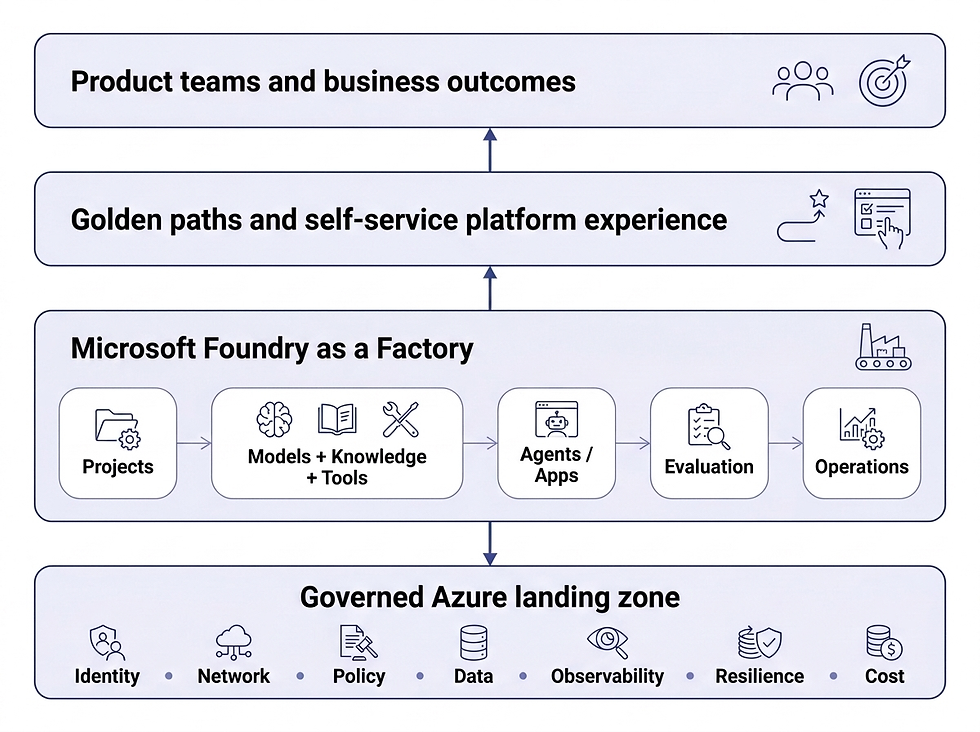
Governed Azure Landing Zone
This is the governed Azure foundation covered in the previous post: resource organisation, networking, identity, RBAC, policy, supporting services, resilience, monitoring and infrastructure as code. The baseline Microsoft Foundry landing-zone architecture is a useful reference for this layer.
Microsoft Foundry as a “Factory”
Foundry supplies the AI capabilities: projects, the Foundry Models catalog, knowledge and retrieval, tools, Foundry Agent Service, evaluation, safety and observability.
Platform as a Product
The platform product adds golden paths, templates, approved catalogues, self-service workflows, delivery pipelines, documentation and support around Foundry.
This third layer is the focus of this post: the work required to make Foundry’s capabilities usable through supported delivery paths, self-service and clear ownership. The Platform Engineering website has a good overview of the Platform as a Product concept.
Getting Started
Start With the Thinnest Viable Platform
I find the Team Topologies idea of a thinnest viable platform is useful here.
Once the landing zone and core Azure services are deployed, the first iteration of an internal AI platform might simply be:
Bicep or Terraform modules for Foundry projects, identities and connections
A repository template or two
Azure DevOps or GitHub Actions pipelines
Concise documentation and examples
A lightweight request workflow
Microsoft’s foundry-samples repository is a decent starting point for the infrastructure templates.
In practice, onboarding should leave a team with a Foundry project endpoint, approved model deployment names, configured connections, the required role assignments, and a starter repository with working evaluation and tracing examples. That gives them somewhere to start without first having to assemble the platform plumbing themselves.
Users and Journeys
A product team or developer rarely wants “a Foundry project plus seven Azure resources”. They want an approved place to build an agent, a suitable model, access to authorised data and tools, a supported way to test behaviour, and a clear route to production.
This shifts the focus from deploying Azure resources to designing how teams will access and use them.
The three golden paths below use a common lifecycle:

The implementation and controls will vary by workload risk, but the stages and ownership questions can generally remain consistent.
Golden Path Examples
In this section, we’ll look at three golden-path examples. Not every path will suit your organisation, but I hope they give you a sense of the controls and frameworks you could adopt.
Golden Path 1: Secure Enterprise RAG
Scenario: A product team wants an internal assistant grounded in controlled business documents, such as HR policies or technical standards.
Request and Provision
The team requests the Secure RAG golden path
They declare the workload owner, audience, data classification, environments and expected usage
The golden path’s IaC and pipeline provision the Foundry project, model deployment, managed identity, Azure AI Search and supporting services
The requesting team is granted the appropriate Azure RBAC roles to access Foundry
Build and Connect Knowledge
The application or agent is scaffolded from an approved repository template
Approved sources are connected, with access controls that ensure users and agents can retrieve only the content they are authorised to see
Ingestion, chunking, indexing and retrieval configuration are defined and version-controlled
For an implementation using Foundry Agent Service, the template connects the agent to Search through a project connection and the Azure AI Search tool. The index name, query type, filters and number of retrieved results are treated as version-controlled workload configuration.
For multi-source agentic retrieval, Foundry IQ knowledge bases are another option. They use Azure AI Search for the underlying indexing and retrieval. The golden path should identify which approach it supports, including its permission and networking requirements. Foundry IQ availability varies by feature and API version, and the documented portal experience remains preview-based.
Evaluate, Release and Operate
Retrieval relevance, groundedness, answer quality, safety, latency and cost are evaluated
Configuration and artefacts are promoted through DEV, UAT and PROD
Retrieval quality, source freshness, failures, token usage and cost are monitored
Where the Platform Boundary Sits
The platform automates: private connectivity, identity plumbing, diagnostic settings, repository scaffolding, baseline index and pipeline configuration, RBAC roles.
The product team decides: authorised content, retrieval design, freshness and deletion requirements, quality thresholds, fallback behaviour and who owns an incorrect answer.

Golden Path 2: Internal Business-Process Agent
Scenario: A team wants an agent that reads enterprise information and takes actions through approved APIs or MCP servers, such as raising a service desk ticket or updating a CMDB record.
Request and Risk Classification
The team follows the supported internal-agent golden path, using an approved starter repository and deployment pipeline
They define the business task, users, information classification and risk tier
They record which decisions the agent may make and which actions require human confirmation
Build With Approved Capabilities
The team chooses an approved model and agent type, e.g. a prompt agent or a hosted agent for custom code
Add permitted knowledge sources
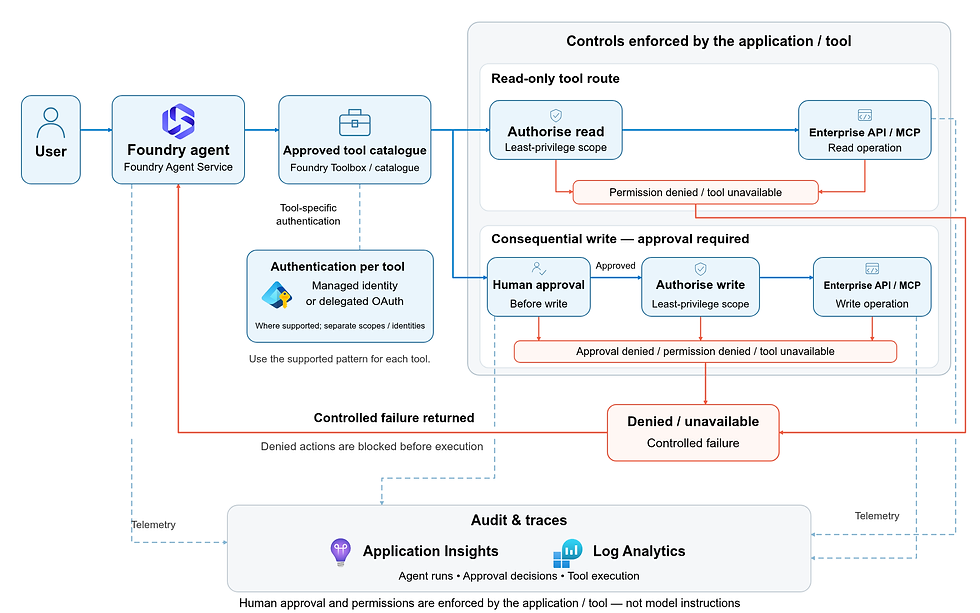
Connect the agent to the platform-managed Foundry Toolbox containing the approved tools it needs, e.g. internal MCP servers
Use the platform’s supported authentication pattern and grant only the tool permissions the agent requires
Store instructions, tool definitions and configuration in source control
Foundry Toolbox gives the platform a concrete way to publish reusable tool collections through a single MCP-compatible endpoint. Manage authentication and tool configuration centrally rather than repeating it in every agent. Evaluate Toolbox changes before promoting a new default version, because multiple consuming agents can pick it up without redeploying.
For MCP integrations, explicitly configure the permitted tools and approval policy, for example, using allowed_tools and require_approval. The consuming application still needs to present approval requests to an authorised person and return the approval decision. This is an execution control, not merely an instruction telling the model to ask permission.
Evaluate, Release and Operate
Test task completion, safety, prompt injection and tool selection.
Validate permission boundaries and confirm unsafe or unavailable tools fail predictably.
Promote through environments using risk-based approval gates.
Trace conversations, model calls and tool execution; review overrides, denied actions and escalation rates.
The agent development lifecycle documentation is also worth checking out here.
Foundry provides immutable agent versions to make this lifecycle more concrete. A delivery pipeline can create a version from the source-controlled definition and target-environment configuration, evaluate it and update the published deployment after the required approvals.
When using Agent Applications, consumers retain a stable endpoint while the deployment is updated to reference the new version. Foundry provides these versioning and publishing capabilities; the organisation still defines the DEV, UAT and PROD promotion workflow.
Publishing also introduces a distinct agent identity, so you must recheck access to downstream services rather than assume it matches the development project’s identity. The documented publishing samples use preview packages; for the chosen implementation, check supported APIs, agent types, and production suitability.
Where the Platform Boundary Sits
The platform automates: standard hosting, telemetry correlation, identity plumbing, evaluation runners, pipeline stages and baseline safety controls
The product team decides: what the agent can do, where approval is required, acceptable failure behaviour, conversation retention, and who owns instruction or tool changes
For this path, I’d pay particular attention to tool permissions and approval boundaries. Tool access is where an agent becomes materially different from a chatbot. An approved model doesn’t make an agent safe if its Entra managed identity can perform an excessive or irreversible action.
Golden Path 3: Governed Model API
Scenario: Multiple application teams need reliable access to approved models without each team deploying and governing its own model estate.
Request and Provision
The team requests a model capability, stating expected volume, latency, geography, data classification and budget
They choose from an approved catalogue of model and deployment combinations
Capacity is allocated in the appropriate Foundry resource or project
Where shared gateway controls are required, use Foundry’s AI Gateway integration with Azure API Management, or a separately managed APIM gateway, depending on the platform’s networking and governance requirements
Entra authentication, quotas, token limits, logging and content controls are applied
SDK examples, endpoint configuration and a test environment are provided
Foundry’s AI Gateway uses Azure API Management underneath and provides project-level token rate limits and quotas. The gateway is enabled at the Foundry resource level and shared across its projects, with separate limits configured for each project. When several applications share a project, you may need additional gateway policies for application-level limits and usage attribution. Project-level limits don't replace per-application controls.
Validate and Operate
Test output quality, latency, throttling, fallback, and cost before granting production access.
Monitor consumption by product or project, along with model health, errors and spend.
Add routing or fallback only where evidence shows a real benefit.
Where the Platform Boundary Sits
The platform automates: endpoint provisioning, gateway policies, authentication, standard logging, quota enforcement and baseline health monitoring.
The product team decides: quality and latency requirements, what data to send, acceptable providers and regions, fallback behaviour, and expected business value.
The “best” model isn’t a universal platform default. A smaller, cheaper model may be entirely suitable for classification or summarisation, while a more capable model is reserved for complex reasoning. The platform should expose this as a supported choice rather than an implementation accident.
Where multiple different models with differing capabilities are required it’s worth considering Foundry’s model router capability. This can select a suitable model for each request from a configured subset behind a single deployment, potentially reducing cost and latency without each team building its own routing logic.

Building and Operating the Platform
Once the golden paths are defined, the platform needs to make them work in practice: support evaluation and observability, and make ownership clear.
Supporting Evaluation and Observability
A secure Foundry environment gives teams somewhere to build and run AI workloads. They also need a supported way to evaluate behaviour and understand what happens in production.
That doesn’t mean the AI platform team owns the quality of every application or agent. The platform’s responsibility is to make evaluation and observability capabilities accessible and straightforward to integrate into the consuming team’s delivery process.
The platform could provide the following:
Guidance and examples for integrating evaluation into delivery pipelines.
Reusable SDK components for running Foundry cloud evaluations and retrieving scored results when teams share common requirements.
A connection from the Foundry project to Application Insights, plus tracing configuration for the supported application or agent framework. Foundry uses OpenTelemetry conventions, and teams can inspect model and tool activity through its tracing experience. The platform also defines telemetry access, retention and sensitive-data handling; access to the Foundry project alone does not guarantee access to the underlying telemetry.
The consuming team remains responsible for representative test data, workload-specific metrics and acceptance thresholds. It also decides whether the results are good enough for its AI use case, with risk or domain specialists involved where appropriate.
For example, a RAG pipeline could run Foundry’s Retrieval, Groundedness and Relevance evaluators against a versioned test dataset. An agent pipeline could add checks for Tool Call Accuracy and Tool Input Accuracy. The platform provides the SDK integration and result reporting; the workload team chooses representative tests, acceptance thresholds and the application’s response when reliable evidence is unavailable.
In factory terms, the platform provides the quality-control facilities. The product team defines the checks its product must pass and remains accountable for the results.
Example Operating Model
The AI platform team owns the experience and contract around the capabilities. It doesn’t necessarily own every underlying service or every workload deployed through it. Below is an example operating model that covers the key activities within the platform:
Primary owner | Responsibilities | Key collaborators |
Cloud / Infrastructure Engineering | Azure landing zone, Foundry resources, networking, identity, policy and infrastructure operations | Security, networking and operations |
Data Engineering | Supported data connections, ingestion and knowledge patterns | Information governance and workload teams |
AI Platform / AI CoE / AI Engineers | Golden paths, templates, model and tool catalogues, evaluation baselines, release guidance and platform roadmap | Product teams, risk, architecture and FinOps |
Product / developers | Workload implementation, acceptance criteria, production behaviour and business outcomes | Product owner, domain experts, risk and operations |
The AI platform product owner sits within the AI platform team and owns the roadmap and adoption, rather than representing a separate ownership group.
Monitoring and incident response follow the service boundary: platform teams own platform issues, while workload teams own application or agent issues, supported by operations. The platform provides capabilities and baseline controls; the consuming team remains accountable for its workload.
Measure Outcomes, Not Resources
It’s easy to count Foundry resources, projects or model deployments. But these are activity measures, not evidence that the platform is working.
The CNCF white paper puts it well:
“Ultimately the success of an organization’s products and applications are the true measure of the success of a platform.” — CNCF Platforms White Paper
The paper groups measures into user satisfaction, organisational efficiency and product delivery (including the DORA metrics). For an AI platform, I’d add quality, safety, and economics.
Adoption and experience: Active and retained teams, golden-path reuse, satisfaction and onboarding friction
Efficiency and delivery: Time to provision, first evaluated response, production lead time and rollback time
Quality and safety: Task completion, groundedness, evaluation pass rate, unsafe responses and blocked actions
Reliability: Latency, throttling, tool failures and recovery time
Economics: Cost per successful agent run, model spend, retrieval cost and capacity utilisation
Business value: Time saved, successful automation and product outcomes
You don’t need all of these on day one. The white paper suggests that “platform teams should use the smallest viable effort to gather the feedback they need”, so a few short conversations or a lightweight survey may be enough to understand where teams are encountering friction.
A Practical 90-Day Starting Point
We’ve covered quite a bit of ground. If I were to start from a freshly deployed Foundry landing zone, this is roughly how I’d approach the first 90 days.
Days 1–30: Discover and Choose
Interview two or three product or developer teams
Identify the most repeated friction
Select one reference workload and one golden path
Agree on the data access, evaluation and release controls for the selected golden path
Define ownership, support boundaries and initial measures
Days 31–60: Build the Thin Path
Create the first pipeline and repository template
Automate Foundry project, identity and connectivity provisioning
Add evaluation and promotion stages to the pipeline
Publish concise documentation and examples
Pilot the path in DEV with one engaged team
Days 61–90: Operate and Improve
Promote the reference workload through UAT and, where it meets the agreed release criteria, into PROD
Measure lead time, manual intervention and evaluation outcomes
Collect qualitative feedback from the pilot team
Identify where additional templates, automation or supported golden paths would remove the most delivery friction
By this point, the aim is to have one supported path in use, evidence of where teams encounter friction and a clear priority for the next improvement.
Conclusion
The first post in this series described the Foundry as a “factory”. The second described the secure Azure foundation underneath it. This post explores what comes next: helping teams use that foundation to build, release, and operate AI workloads.
Microsoft Foundry can provide the models, agents, tools, knowledge, evaluation and observability at the centre of an internal AI platform. The AI platform team’s job isn’t to hide or rebuild it, but to package those capabilities into supported journeys, automate repeated plumbing, embed sensible guardrails and leave meaningful decisions with accountable teams.
Choose one repeated AI delivery journey, pilot the thinnest golden path with an engaged product team and measure the friction involved in reaching a safe production outcome. Then improve it before adding the next path.
I hope you found this post useful. As always, I welcome feedback and questions.
Useful Links
You may find the following links helpful:


Comments